PSA: Apple container bloats Time Machine backups
After playing with Apple container, my Time Machine backups started failing with the error: “The backup disk is full”.
On that particular Mac, the disk is 2TB and I am only allocating 1.5TB to Time
Machine over Samba. That’s why the error isn’t particularly surprising at first
glance. What’s surprising is that /nix on the Mac was using almost 1TB and is
excluded from Time Machine, in addition to a few other things (VMs, cache
directories, etc.). As a result, the Samba share should have easily fit what I
needed to back up (plus keep some older copies).
Puzzled, I started investigating. LLMs couldn’t pinpoint the exact issue, but
helped me realize that a single Time Machine backup had grown to occupy the
full 1.5TB. Once I discovered that Time Machine mounts the backup image as a
file system under /Volumes/Backup of <hostname>, I pointed the great Disk
Inventory X at it to take a look at what was eating my backup space. Here’s
the result:
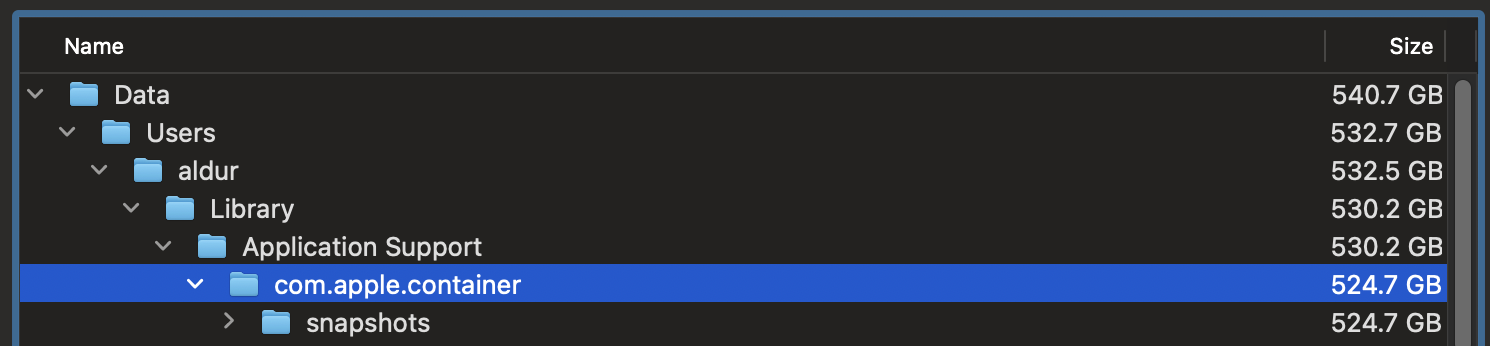 The whole backup is about 540GB, of which 524GB are from
 container/snapshot.
I later found issue #404 in the container repository, where multiple
users report the same issue. To prevent this from happening again, you can
exclude the container state from your Time Machine backups as follows:
tmutil addexclusion ~/Library/Application\ Support/com.apple.container
Unfortunately, I tried and failed to recover space from the existing bloated backup, so I just deleted it and started from scratch.