Offline local inference on macOS
Local inference lets me run agentic workflows on sensitive data (e.g., financial or health records) while keeping both the computation and the data offline. That’s my number one reason for it: confidentiality.
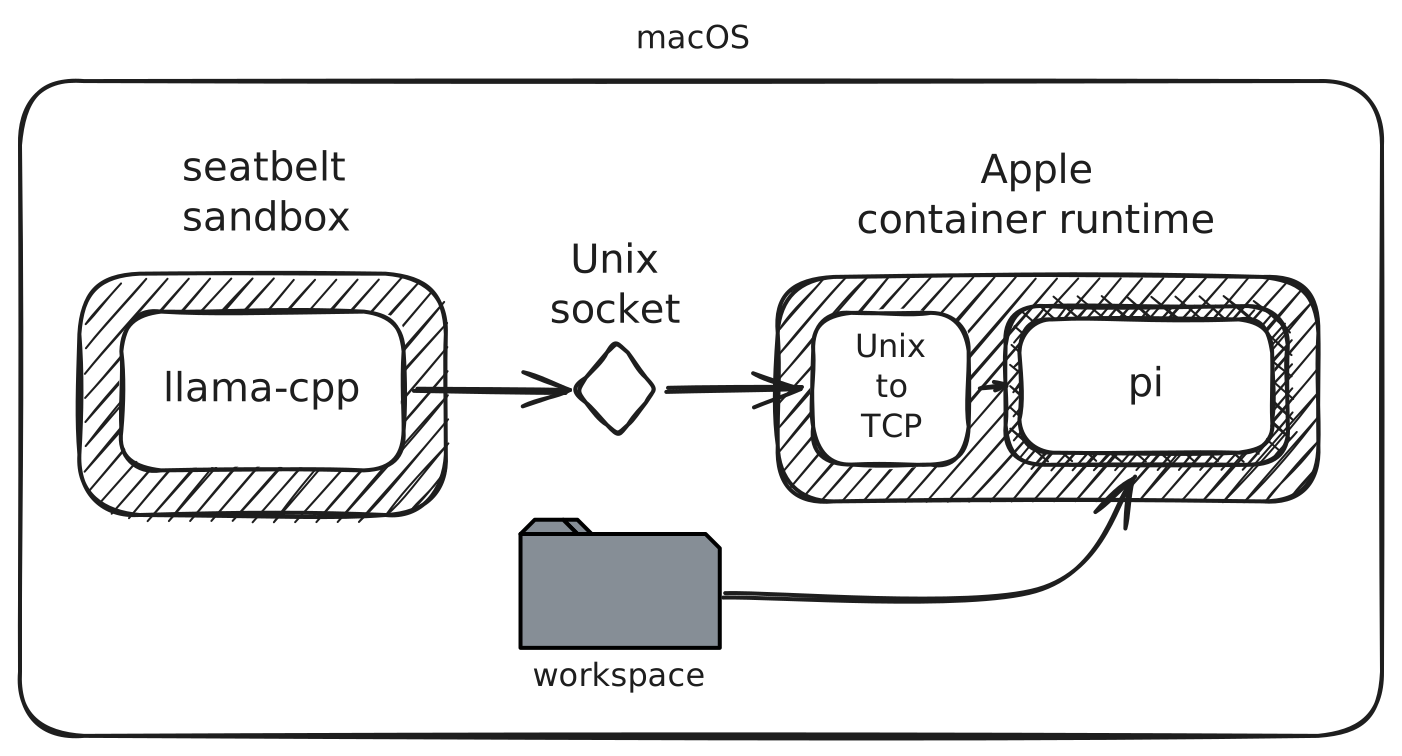
Ensuring that (rogue) agents don’t wander around is a hot topic. My setup pairs:
- Sandboxed inference on
macOS, which uses
seatbeltto harden the runtime and prevent remote connections. - An offline Apple
container that bundles
piand a few useful tools in a NixOS image.
# Threat modeling
llama-cpp runs under seatbelt with read-only access to the model files and
no internet access. Models and chat templates are downloaded beforehand. The
sandbox adds a level of defense in case of vulnerabilities in the inference
engine (e.g., in Jinja template parsing).
pi runs in an Apple container with DNS and external networking disabled. It
communicates with llama-cpp over a Unix socket mounted within the container.
A small relay exposes the Unix socket as a local TCP endpoint for pi to
connect to. pi works in a workspace mounted read/write inside the container.
In terms of threat modeling, this setup is probably good enough although likely
not bulletproof: a new KVM escape just reminded us that VM isolation can
fail. On the llama-cpp side, seatbelt helps reduce the attack surface. Things
are different on the pi side. The Apple container runtime has had some
security issues, but it has held up reasonably well against my
light red-teaming so far.
The biggest attack surface is the mounted workspace. An agent can “poison” it
and then try to exfiltrate data when tools on macOS act on those files (e.g.,
by planting a malicious git hook). To reduce that risk, I restrict what the
agent can do inside the container (e.g., prevent writes to the .git folder)
and harden the host configuration (e.g., disable git hooks entirely).
It’s a cat-and-mouse game: we do our best to stay ahead, balancing security and practicality. For instance, we could copy the workspace into the container and review any changes before copying them back to the host. Mounting is slightly more practical. We need to get things done, after all.
# Running it
On an M3 Max 64GB MacBook Pro, I run llama-server through
sandboxed-ai and pi in the
aldur-pi container as follows.
Both commands are long and ugly, but I prefer to see exactly what I’m running
on the host. I have also painstakingly reviewed the sandboxed-ai code
and kept it readable so that others can inspect it too.
sandboxed-ai --log llama-server --socket \
  -hf unsloth/Qwen3.8-27B-GGUF:UD-Q4_K_XL \
  --spec-type draft-mtp \
  --spec-draft-n-max 3 \
  -ngl 99 -ngld 99 -fa on \
  --jinja \
  --chat-template-file froggeric/Qwen-Fixed-Chat-Templates:chat_template.jinja \
  -c 262144 --parallel 1 \
  -ctk q8_0 -ctv q8_0 \
  -b 4096 -ub 2048 \
  --load-mode mlock \
  --temp 1.0 --top-p 0.95 --top-k 20 --min-p 0 \
  --presence-penalty 0.0 --repeat-penalty 1.0 \
  --reasoning-preserve \
  --perf --log-timestamps -lv 4 \
  --cors-origins localhost
I am also experimenting with fewer checkpoints to reduce memory pressure during
long runs. With the server running, start pi in another terminal:
# Pull the container image while online
container image pull ghcr.io/aldur/aldur-pi:latest

# Run it
# Replace $HOME/work/project with your workspace path
env -u SSH_AUTH_SOCK container run -it --rm \
  --network none --no-dns \
  --read-only \
  --tmpfs /tmp:mode=1777 \
  --tmpfs /var/tmp:mode=1777 \
  --tmpfs /home/aldur:uid=501,gid=100,mode=0700 \
  --cap-drop ALL \
  --cap-add CHOWN --cap-add SETUID --cap-add SETGID --cap-add SYS_CHROOT \
  --volume ~/.local/state/sandboxed-ai/sockets/llama-server.sock:/var/host-services/llama.sock \
  --volume "$HOME/work/project:/workspace" \
  --env LLAMA_SOCKET_PATH=/var/host-services/llama.sock \
  ghcr.io/aldur/aldur-pi:latest --models 'llama-cpp/*'