Why my internet dropped like clockwork
I recently upgraded my home network to gigabit internet provided by O2, the
low-cost brand of Movistar Spain. They run fiber to the home (FTTH) and
lease consumers their routers to convert the optical signal into an electric
one. In my case, I got a Mitrastar HGU router (GPT-2742GX4X5 v6, running
firmware GL_g2.5_100XNT0b23).
ISP routers come with security and privacy concerns: where possible, I replace them with alternatives I can customize and control. At home, I already own a router that supports OpenWRT. It’s much better from a security/privacy standpoint, but it doesn’t have an ONT and so I cannot connect it directly to fiber.
To fix that, I configured the ISP router in bridge network mode and connected one of its LAN ports to the WAN on my router. Then, within OpenWRT, I configured the required PPPoE credentials and created a VLAN. I got online, made a few speed measurements, and ensured that everything was working great.
After some time I noticed that the connection dropped and that the web interface of the router wasn’t reachable anymore. I brushed it off, thinking that the network would eventually stabilize. But it kept happening! So I dug a bit more. At first, I thought of a hardware issue (maybe on the fiber line). Then, I noticed the following pattern:
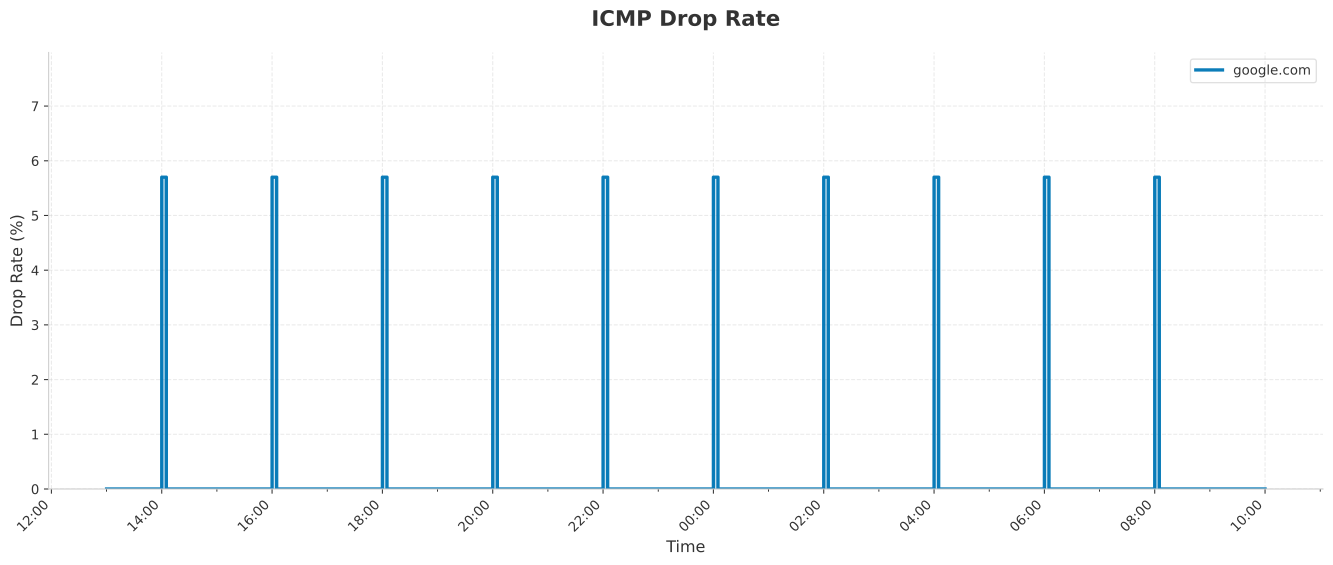
Drops so predictable likely indicated a software issue. After ensuring that the issue wasn’t on OpenWRT’s side, I started looking at the HGU router. Mitrastar firmwares have a history of bugs; it is also likely that bridge mode, isn’t as battle-tested as the rest, because few users enable it.
ISP routers can be a mixed bag in terms of debug access. This one is weirder than usual:
- User
1234cansshinto the router with a password printed on a label on the router’s back. - By default,
sshdrops the user into a restricted shell, unless you usessh [email protected] /bin/shto get a better shell.
$ ssh [email protected]
[email protected]'s password:
>ls
Can't find command: [ls]. Type '?' for usage
>?
>?
# Confused at what's going on
<c-d>
$ ssh [email protected] /bin/sh
[email protected]'s password:
ls
rom-t
busybox
BusyBox v1.26.2 (2025-06-19 15:12:31 CST) multi-call binary.
...
The 1234 user is technically root; the shell is based on busybox and it
is half-broken: there are no prompts and ls doesn’t show the full directory
listing. However, it’s enough to start digging.
After poking around, I discovered the router configuration at
/tmp/var/pdm/config.xml. It refers to a watchdog, which seems to be one of
the customizations that TELEFONICA (Movistar’s brand in Spain) applied to it:
<X_TELEFONICA_COM_Watchdog>
  <Enable PARAMETER="configured" TYPE="boolean">1</Enable>
  <PPP>
    <LookupDomain PARAMETER="configured" TYPE="string">hgu.rima-tde.net</LookupDomain>
    <MaxReset PARAMETER="configured" TYPE="uint32">1</MaxReset>
    <AlertAfter PARAMETER="configured" TYPE="uint32">2</AlertAfter>
    <WD_CheckChange PARAMETER="configured" TYPE="uint32">900</WD_CheckChange>
  </PPP>
  <Info>
    <Process PARAMETER="configured" TYPE="string">pppd;ztr69;zebra;ripd;zywifid;igmpproxy;voiceApp;tefdog</Process>
  </Info>
</X_TELEFONICA_COM_Watchdog>
The watchdog itself appears to be tefdog. When running in bridge mode some of
its health checks likely fail and trigger a restart of the connection. It also
seems to leak memory, which explains why the web interface would become
unreachable after a while. In particular, the list of monitored processes
always includes pppd, even though it doesn’t run in bridge mode.
To test the hypothesis of a badly configured watchdog, I first tried to kill
it and wait. That did not work, because PID 1 would restart it after a few
minutes. Because the file-system on the router is read-only, I couldn’t edit
the executable directly. But I could use a bind mount over it:
echo '#!/bin/sh' > /tmp/tefdog_fake
echo 'exit 0' >> /tmp/tefdog_fake
chmod +x /tmp/tefdog_fake
mount --bind /tmp/tefdog_fake /usr/bin/tefdog
At this point, I killed it again, ensured it would not restart, and waited for a few hours to see if the connection would drop. When it didn’t, I knew I had found the issue!
The bind mount hack, however, wouldn’t survive a reboot. After a power loss, the router would restart and the watchdog would resume killing the connection every two hours. I kept poking around for ways to persist the change or to overwrite the router configuration, until I remembered that a router’s web interface typically allows backing up and re-uploading the configuration. In some cases, modified configurations would also unlock settings not available through the web interface.
I went ahead, exported the configuration through the web UI, and quickly discovered that it is encrypted:
$ file romfile.cfg
romfile.cfg: openssl enc'd data with salted password
I mentioned that this router is a bit weird, didn’t I? ssh provides root
access, but only if you know which process to launch. You can read the
configuration through SSH, but then the export is encrypted. After a bit more
digging, I figured out where the decryption happens in the firmware:
/usr/bin/ccc_preload.sh: openssl aes-256-cbc -md MD5 -k $2 -d \
  -in /usr/etc/smt.cfg -out /var/pdm/config.xml
# NOTE: I added the line break for readability.
Later on, I discovered where the encryption password is stored and that it’s a
base64 encoding of 24 (random?) bytes:
$ grep ENCRYPT /etc/MLD_Config.sh
MLD_APPS_ENABLE_ENCRYPT_CONF_FILE_KEY=zRUqIM1VCqPBrlYbf6CXiOZoZwiIAMHJ
# NOTE: this isn't my encryption key, but a similar-looking one.
I don’t have another router to check whether this password is hardcoded into the firmware or generated depending on the hardware (e.g., the MAC address). Out of an abundance of caution, I haven’t shared the exact key I found on my router, but feel free to reach out if you are interested in it.
After testing the decryption key, I modified the configuration by disabling the watchdog:
diff -u config.xml.back config.xml
--- config.xml.back 2026-02-01 18:28:36
+++ config.xml 2026-02-01 18:41:10
@@ -292,7 +292,7 @@
     </Firewall>
   </X_TELEFONICA_Firewall>
   <X_TELEFONICA_COM_Watchdog>
-    <Enable PARAMETER="configured" TYPE="boolean">1</Enable>
+    <Enable PARAMETER="configured" TYPE="boolean">0</Enable>
     <PPP>
       <LookupDomain PARAMETER="configured" TYPE="string" LENGTH="256">hgu.rima-tde.net</LookupDomain>
       <MaxReset PARAMETER="configured" TYPE="uint32" MAX="9" MIN="0">1</MaxReset>
While I was at it, I also made a few more changes to disable analytics, prevent
the router from phoning home, turn off WPS and block TR069 at the
firewall level, preventing remote firmware upgrades or configuration changes.
diff -u config.xml.back config.xml
--- config.xml.back 2026-02-01 18:28:36
+++ config.xml 2026-02-01 18:41:10
@@ -150,7 +150,7 @@
             <Action PARAMETER="configured" TYPE="string" LENGTH="16">Permit</Action>
             <Protocol PARAMETER="configured" TYPE="string" LENGTH="16">TCP</Protocol>
             <X_5067F0_RuleName PARAMETER="configured" TYPE="string" LENGTH="64">Default_TR069</X_5067F0_RuleName>
-            <Enabled PARAMETER="configured" TYPE="boolean">1</Enabled>
+            <Enabled PARAMETER="configured" TYPE="boolean">0</Enabled>
             <Origin>
@@ -602,7 +602,7 @@
             <ConfigMethodsEnabled PARAMETER="configured" TYPE="string" LENGTH="128">PushButton</ConfigMethodsEnabled>
             <X_5067F0_WPS_Last_State PARAMETER="configured" TYPE="boolean">1</X_5067F0_WPS_Last_State>
             <SetupLock PARAMETER="configured" TYPE="boolean">1</SetupLock>
-            <Enable PARAMETER="configured" TYPE="boolean">1</Enable>
+            <Enable PARAMETER="configured" TYPE="boolean">0</Enable>
             <DevicePassword PARAMETER="configured" TYPE="uint32" MAX="4294967295" MIN="0">0</DevicePassword>
           </WPS>
           <PreSharedKey>
@@ -921,7 +921,7 @@
             <ConfigMethodsEnabled PARAMETER="configured" TYPE="string" LENGTH="128">PushButton</ConfigMethodsEnabled>
             <X_5067F0_WPS_Last_State PARAMETER="configured" TYPE="boolean">1</X_5067F0_WPS_Last_State>
             <SetupLock PARAMETER="configured" TYPE="boolean">1</SetupLock>
-            <Enable PARAMETER="configured" TYPE="boolean">1</Enable>
+            <Enable PARAMETER="configured" TYPE="boolean">0</Enable>
             <DevicePassword PARAMETER="configured" TYPE="uint32" MAX="4294967295" MIN="0">0</DevicePassword>
           </WPS>
           <PreSharedKey>
@@ -1502,7 +1502,7 @@
     <X_5067F0_Installed PARAMETER="configured" TYPE="boolean">1</X_5067F0_Installed>
     <X_5067F0_CheckCertificateCN PARAMETER="configured" TYPE="boolean">0</X_5067F0_CheckCertificateCN>
-    <PeriodicInformEnable PARAMETER="configured" EXTATTR="0x0800" TYPE="boolean">1</PeriodicInformEnable>
+    <PeriodicInformEnable PARAMETER="configured" EXTATTR="0x0800" TYPE="boolean">0</PeriodicInformEnable>
     <PeriodicInformInterval PARAMETER="configured" EXTATTR="0x0800" TYPE="uint32" MAX="4294967295" MIN="30">604800</PeriodicInformInterval>
     <X_5067F0_CAContent>
       <i1>
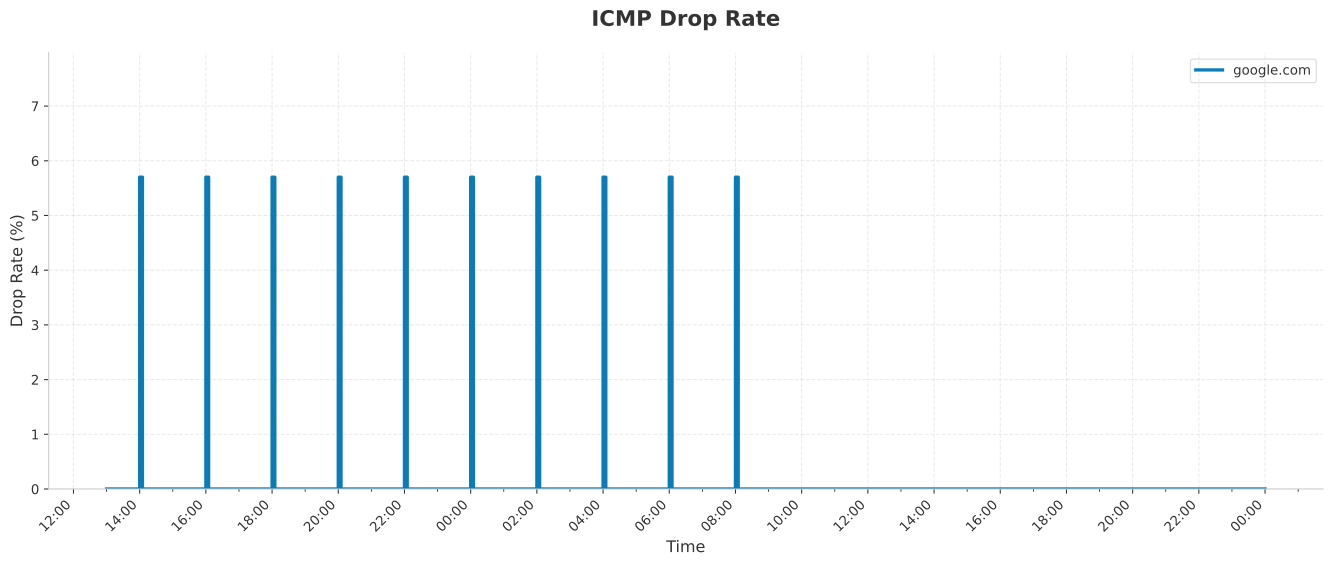
After re-encrypting the modified configuration, I uploaded it, rebooted the router, and it has since been running smoothly:
To wrap things up, I also dumped the bootloader and the firmware (just in case, as neither seems to be available online):
cat /dev/mtd0 > /tmp/bootloader.bin
cat /dev/mtd4 > /tmp/tclinux.bin
md5sum /tmp/bootloader.bin
16fa4cafc4e2c412e053e8757af3d60b  /tmp/bootloader.bin
md5sum /tmp/tclinux.bin
8bb6e6d4e1fb231e4fbb0a98a494ccaf  /tmp/tclinux.bin
nc 192.168.1.3 1234 < /tmp/bootloader.bin
nc 192.168.1.3 1234 < /tmp/tclinux.bin
One mystery remains. Why did the drops happen exactly every two hours? I looked at the router configuration and then had an AI agent look at the firwmware through Ghidra’s MCP. The most convincing explanation (so far) is that the watchdog performs a check every 15 minutes. After 4 failed checks, it tries to restart the PPP interfaces (a noop in bridge mode). After 4 more failed checks, it sends a telemetry event to the ISP’s IoT bridge on Azure. Which, in response, requests a reset of the network stack and temporarily drops the connection. Here are the relevant parameters from the decrypted configuration:
| Parameter name | Value | Notes |
|---|---|---|
| WD_CheckChange | 900 | seconds, frequency of checks |
| AlertAfter | 2 | how many failed checks before resetting PPP (off-by-one, the decompiled shows it resets when ≥ 3, 0-based) |
| MaxReset | 1 | how many resets to try before notifying upstream |
Thank you for reading so far! Reach out if you’d like to chat. 👋