NixOS Baguette images in ChromeOS
Baguette 🥖 allows running VM images in ChromeOS. It supersedes Crostini, which used to run containers through LXC, and gives users better performance and more freedom (e.g., to run Kubernetes without KVM or access the GPU).
The nixos-crostini repository already includes the magic glue to build
NixOS containers that fully integrate with Crostini. When
someone asked
if it would be possible to support Baguette as well, I peeked at what that
would take. This post describes the results.
tl;dr: You can build Baguette images of your NixOS configuration. The images provide the same features and UX (e.g., clipboard sharing, Wayland/port forwarding, notifications, file browsing from ChromeOS) as the default Debian Baguette installs, can be built in CI, and can be fully customized to your liking.
# Background: ChromeOS VMs
Under the hood, ChromeOS runs VMs through crosvm, a hardened virtual
machine monitor. We already met it when investigating FIDO2 support in Linux
ChromeOS guests.
Crostini used crosvm to run a stripped-down VM called termina that
booted quickly to run the user’s containers. It also did a few more things:
- It mounted
crosvm-toolsthroughcrosvminto a guest directory (and later into containers as well). - It ran
vshd, allowing the host to get a shell on the guest. - It handled the lifecycle of the VM and of its processes through
maitred.
The default Baguette image is based on Debian and replicates all this.
In addition, it configures the VM to run garcon and sommelier (in Crostini
they run within the container) to provide URI handling, file browsing, and X/Wayland
forwarding: all those things that make Crostini/Baguette seamless to use
on ChromeOS.
# Baguette NixOS images
Our NixOS Baguette image will replicate the Debian setup. Unlike Debian, NixOS
cannot run non-Nix executables due to the lack of FHS and of a global
library path. Luckily, we won’t need to worry about that: crosvm-tools
include their own libraries and dynamic linker, so they run without issues in
NixOS.
When we built NixOS LXC images for Crostini, we learned how to run garcon and
sommelier at user login. To enable support for crosvm-tools, vshd, and
maitred as well, I added their systemd unit definitions.
Booting the VM requires a compressed BTRFS image built from a rootfs
tarball. To build the tarball through a Nix derivation, I took a page from
the
lxc-container NixOS module. Then, to package it:
- I first tried the Python script used by Google, but it depends on
libguestfs-appliance, which is not available foraarch64-linuxinnixpkgs1. - I later switched to QEMU, which works with Nix and supports ARM2.
After transferring the image to the Chromebook’s “Downloads” directory, we can
run it from crosh:
vmc create --vm-type BAGUETTE \
  --size 15G \
  --source /home/chronos/user/MyFiles/Downloads/baguette_rootfs.img.zst \
  baguette

vmc start --vm-type BAGUETTE baguette
You might have heard of the #crostini-containerless flag, which has
been the default since ChromeOS M147. You don’t need to worry about it: the
command above specifies the --vm-type, so it runs regardless. The flag only
affects what happens when you “Configure Linux” in ChromeOS or use the
“Terminal” app to launch Linux.
At boot, maitred relies on /usr/sbin/usermod to configure users and groups.
usermod lives under a different path in NixOS, so I symlinked it there to get
to a shell. Within the VM, I configured the DNS to use the host’s resolver and
set the environment variables required by crosvm-tools.
X/Wayland and port forwarding were the last pieces of the puzzle. By going
through the source code and the logs, I found out that the /dev/wl0 device
was missing read/write permissions for non-root users. I fixed it with a quick
udev rule, and clipboard sharing and GUI apps started to work. I also created
a systemd unit to start cros-port-listener and enable automated
port forwarding from Baguette to ChromeOS (very handy when writing this post to
preview it in Chrome).
With our image prepared and all issues fixed, Baguette is ready to shine! The
baguette.nix file includes the detailed configuration. Here is the
result, showing a baguette-nixos VM correctly forwarding a Wayland session to
ChromeOS.
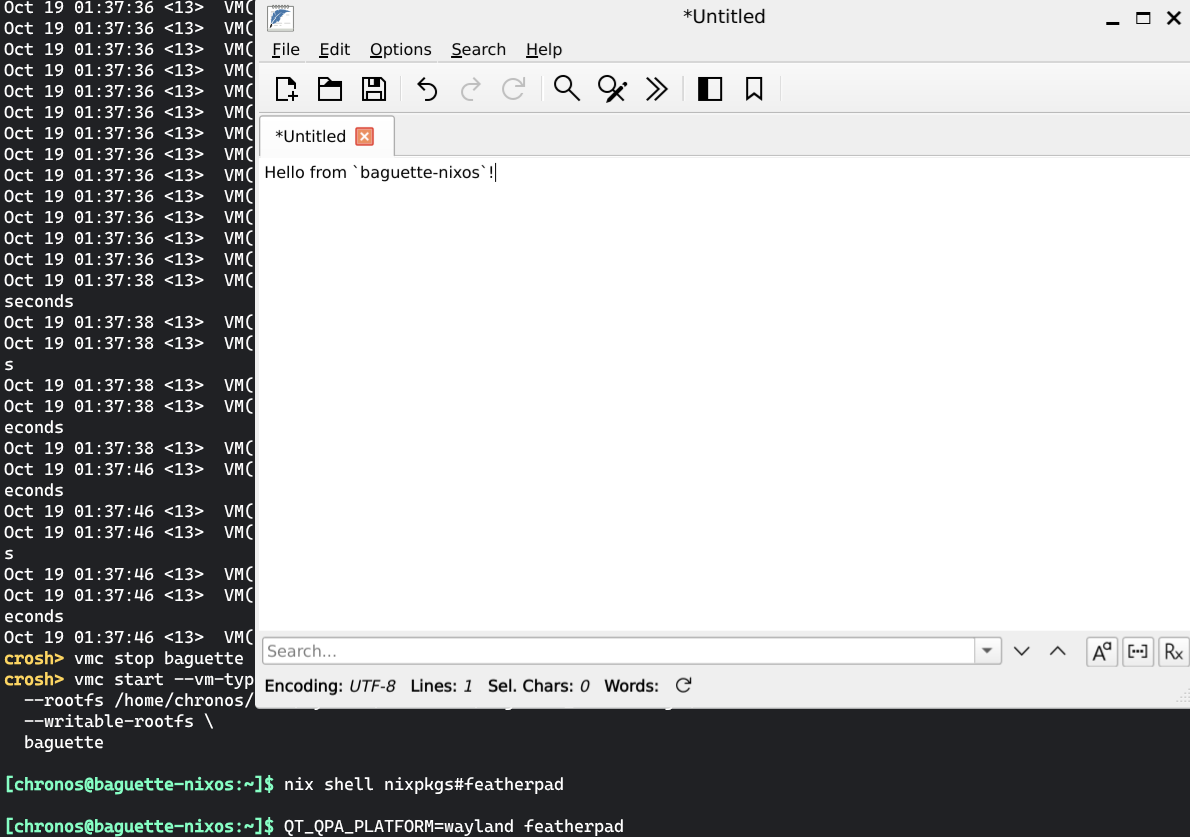 Wayland forwarding working in a Baguette VM.
# How-to: Make it yours
Use nixos-crostini to build Baguette images. If you give it a try, let
me know how it goes through any of the contacts in the footer.
The repository’s CI automatically builds the configuration and uploads the image as a GitHub workflow artifact. Download it to quickly boot Baguette and then rebuild NixOS from your customized configuration.
If you want to change the default username, fork the repository and edit the configuration. The CI will rebuild the image for you.
# How-to: Launch NixOS from “Terminal”
The Terminal application defaults to launching a VM named termina. To launch
our VM, we will need to replace the default one. From crosh:
vmc stop termina
vmc stop baguette

# Optional: back up `termina`
vmc export termina /home/chronos/user/MyFiles/Downloads/termina.img

# WARNING: This destroys your existing `termina` VM and any data it contains.
vmc destroy termina

vmc export baguette /home/chronos/user/MyFiles/Downloads/baguette-nixos.img

vmc create --vm-type BAGUETTE \
  --size 15G \
  --source /home/chronos/user/MyFiles/Downloads/baguette-nixos.img \
  termina

# Optional: destroy the other `baguette` VM
vmc destroy baguette

vmc start --vm-type BAGUETTE termina
The Terminal application will now be able to launch your VM under the legacy
display name penguin.
# How-to: USB forwarding
You can forward USB devices to Baguette from Settings → Linux → Manage USB devices:
- Toggle Enable persistent USB device sharing with guests.
- Enable any USB device you’d like available to Baguette.
Selected devices will automatically be forwarded to Baguette once plugged in. That’s it!
# How-to: USB forwarding with crosh
If you want more control and prefer to enable USB forwarding through crosh,
Baguette simplifies the LXC approach because it
doesn’t need a container name.
Insert the device and then navigate to chrome://usb-internals. In the
devices tab, note the Bus number and Port number of your device.
dmesg in crosh will provide the same information, if you prefer.
Now open a crosh shell and attach the USB device to the VM:
# Replace <bus> and <port> with the Bus and Port number from above.
vmc usb-attach baguette <bus>:<port>
# How-to: Root login
The Debian image allows passwordless sudo. The default NixOS configuration in
nixos-crostini replicates the approach, so that you can escalate
privileges to rebuild your configuration from within the VM.
I prefer to disable passwordless sudo and instead SSH as root. This way, I can use a hardware key
to prove my physical presence, while an attacker cannot automatically escalate
privileges.
# How-to: Additional crosh shell sessions
To get additional shell sessions in crosh, use:
vsh baguette penguin
We don’t really need the penguin argument, but without it we will get the
following error:
if attempting to connect to a containerless guest please use
vsh termina
  penguin
.
# Conclusion
Getting Baguette and NixOS to work together required some trial and error to build the image in the right format, figure out a few quirks, and adapt to ChromeOS’s CLI updates. I am pretty happy with the result: I wrote this blog post from Baguette, and I couldn’t tell the difference from legacy Crostini.
I don’t run Kubernetes (which seems to be one of the biggest pain points for LXC users), but Baguette improves a few things for me as well:
- Besides automatically forwarding USB devices, Baguette does not hold an
exclusive lock on USB hardware keys, so I can use them both in Baguette and in
ChromeOS (as a passkey) at the same time without having to fiddle with
crosh. - A containerless VM has better access to the underlying hardware and better
control of its
init. This might make it easier to implement ephemeral storage and seems to fix an issue withpcscdthat would make it stop interacting with Yubikeys after a while, until restarted.
Thanks for reading, and ‘til next time! 👋
-
I was experimenting with all this on the ARM-based Chromebook that I use for couch-computing. ↩
-
Because I wanted the build scripts to run within the default
penguinimage, I also overrode the derivation so that it falls back to emulation when/dev/kvmis missing. ↩